In the world of content creation, access to reliable and efficient video editing tools has never been more critical. Yet, not every creator has access to high-performance machines capable of running resource-intensive software like Adobe Premiere Pro or DaVinci Resolve. For users working with low-spec computers — older laptops, mid-tier desktops, or even lightweight Linux machines — open-source video editors often provide efficient and capable alternatives without consuming too much system memory or processing power.
TL;DR: If you’re looking for open-source video editors that are light on system resources and most often recommended by users on Reddit for underpowered machines, four names come up repeatedly: Shotcut, OpenShot, Avidemux, and Kdenlive. Each offers distinct features and efficiency. Shotcut and OpenShot are ideal for basic yet flexible editing. Avidemux shines in extremely lightweight tasks like quick format conversions or trims, while Kdenlive, though richer in features, remains optimized enough for mid-tier systems. All of them are free, actively developed, and worthy of a serious look.
Table of Contents
What Reddit Says About Lightweight Video Editing
Reddit has long served as a valuable resource for real-world software experiences, often providing honest and unbiased reviews. When numerous Redditors across subreddits like r/VideoEditing, r/linux, and r/opensource share consistent recommendations, it’s worth paying attention. Below are the top open-source video editors, according to those who’ve tested them under modest hardware conditions.
1. Shotcut – Powerful Yet Surprisingly Lightweight
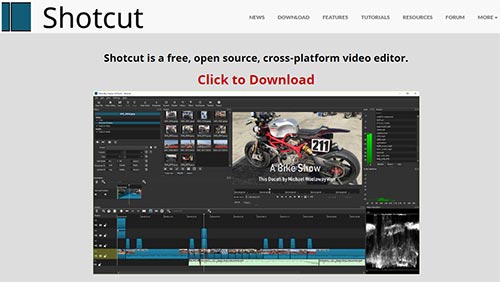
Shotcut frequently appears as Reddit’s go-to recommendation for a cross-platform, open-source editor that balances features with resource efficiency. It supports a wide array of video formats thanks to its FFmpeg-based backend, and its user interface is clean and highly customizable.
- Platform: Windows, macOS, Linux
- File Format Support: Extensive, via FFmpeg
- Hardware Requirements: Minimal; runs decently on 4GB RAM systems
- Unique Feature: Native resolution and frame rate independence — you can mix different videos without converting them first
Reddit users particularly appreciate Shotcut’s modular UI approach and background threading, which allow even older systems to render and export clips without constantly freezing. It does not require installation either; a portable version is available—even better for underpowered devices.
Noteworthy Reddit quote from r/linux: “Shotcut is the only editor that I’ve used extensively on my 10-year-old ThinkPad without pulling my hair out.”

2. OpenShot – Simplicity First
OpenShot catches the eye for its extremely straightforward interface. Designed with beginners in mind, it provides all the essentials: cut, trim, transition effects, titles, and even slow-motion effects. Redditors often recommend it as an ideal starter tool for lightweight editing tasks, highlight reels, school projects, or social media clips.
- Platform: Windows, macOS, Linux
- Key Strength: Ideal for beginners and quick-edit scenarios
- System Load: Light on CPU, relies on RAM more heavily during previews
- Drawback: Occasionally suffers from performance hiccups on very large projects
One of OpenShot’s key innovations is its intuitive real-time preview system, which reduces rendering time during editing. It also allows keyframe animations without deep technical knowledge — a frequent plus cited by Reddit users.
Reddit says: “OpenShot won’t blow your mind, but it won’t blow up your laptop either. For most of my YouTube shorts, it’s perfect.” – user on r/VideoEditing
3. Avidemux – The Lightweight Champion
Unlike traditional timeline editors, Avidemux is more task-specific. It excels in fast encoding, trimming, and simple filter application, making it perfect for users whose editing needs do not involve complex storytelling or tutorial-style videos.
- Platform: Windows, Linux, macOS
- Best For: Compression, basic trim/cut, format conversion
- Notable Advantage: No need for project rendering — edits are lossless and direct
- System Resource Use: Extremely low; runs on as little as 2GB RAM systems
Many Reddit users praise Avidemux for being the fastest way to trim videos without re-encoding large files, saving both time and quality. Its clean interface, no frills, and snap-to-purpose design are often the reason it continues to rank high in discussions about lightweight tools.
Reddit verdict: “Avidemux is my weapon of choice for trimming and re-encoding surveillance footage or compressing lecture videos. Super fast and doesn’t ask for a GPU.”
4. Kdenlive – Feature-Rich but Smartly Optimized
Although Kdenlive — KDE’s Non-Linear Video Editor — boasts an extensive set of tools, it’s surprisingly efficient and performs decently on mid-to-low powered systems, especially under Linux environments. Reddit’s developer and Linux enthusiasts often prefer it for balancing power and efficiency.
- Platform: Primarily Linux, also available for Windows and macOS
- Performance Note: While richer in features than the others in this list, can run smoothly with tune-ups on systems with 4-8GB RAM
- Advanced Functionalities: Multi-track editing, GPU acceleration, proxy clips
- Customizability: Modular interface and scripting support
Kdenlive’s proxy clip system is a game changer for low-end PCs, as it allows you to edit at lower-quality previews while preserving the full resolution at export. This reduces both CPU strain and RAM consumption during the editing process. It also supports hardware acceleration — a topic that comes up often on Reddit when trying to squeeze performance from aging devices.
Feedback from Reddit: “Set up your proxy clips and disable real-time effects. Do that, and Kdenlive runs smooth even on my old Ryzen 3 laptop.” – user from r/linuxvideoediting
Final Thoughts: Choose According to Your Workflow
Every editor listed serves a different need. Redditors are quick to note this distinction, often advising newcomers to consider what kind of projects they plan to work on. Here’s a quick breakdown based on typical use-case scenarios:
- Best for Beginners: OpenShot
- Best for Trimming and Quick Fixes: Avidemux
- Best Overall Balance: Shotcut
- Best for Power Users on Mid-Low Systems: Kdenlive
While hardware constraints may limit your choice of software, they don’t have to limit your creativity. The open-source community, alongside insightful Reddit contributors, ensures there’s a viable tool for nearly every need — even on low-spec machines. Millions of video creators around the world are already using these resources to tell compelling stories, share tutorials, or simply turn raw footage into something more meaningful.
Choose wisely, tweak thoughtfully, and let your imagination do the rest.