
You just bought a new Acer laptop, monitor, or tablet. Nice choice. Sleek design. Fresh smell. Big potential. But before you dive into work or gaming, there is one small step you should not skip. Product registration. It takes only a few minutes. And it can save you a lot of stress later.
TL;DR: Registering your Acer product activates and confirms your warranty. You need your device’s serial number and purchase details. Go to Acer’s official registration page, sign in or create an account, and follow the steps. Once done, you get easier support, faster repairs, and peace of mind.
Table of Contents
Why Acer Product Registration Matters
Let’s keep it simple. When you register your Acer device, you:
- Activate your warranty officially.
- Get faster customer support.
- Receive product updates and alerts.
- Track repair status easily.
- Prove ownership if your device is lost or stolen.
Without registration, you may still have warranty coverage. But support becomes slower. You may need more paperwork. And things get complicated.
Registration turns a “maybe” into a smooth and stress free process.
What You Need Before You Start
Don’t worry. You do not need a tech degree. Just grab these:
- Your Acer device
- The serial number
- The date of purchase
- Your receipt or proof of purchase
- An internet connection
That’s it. Ready? Let’s go step by step.
Step 1: Find Your Acer Serial Number
This is the most important piece of information. The serial number (often called S/N) is unique to your device.
You can find it in a few places:
- On a sticker at the bottom of your laptop.
- On the back of a monitor.
- Inside the battery compartment (for some models).
- On the original box packaging.
For laptops, you can also:
- Press the Windows key + R
- Type cmd and press Enter
- Type: wmic bios get serialnumber
Boom. Your serial number appears on screen.
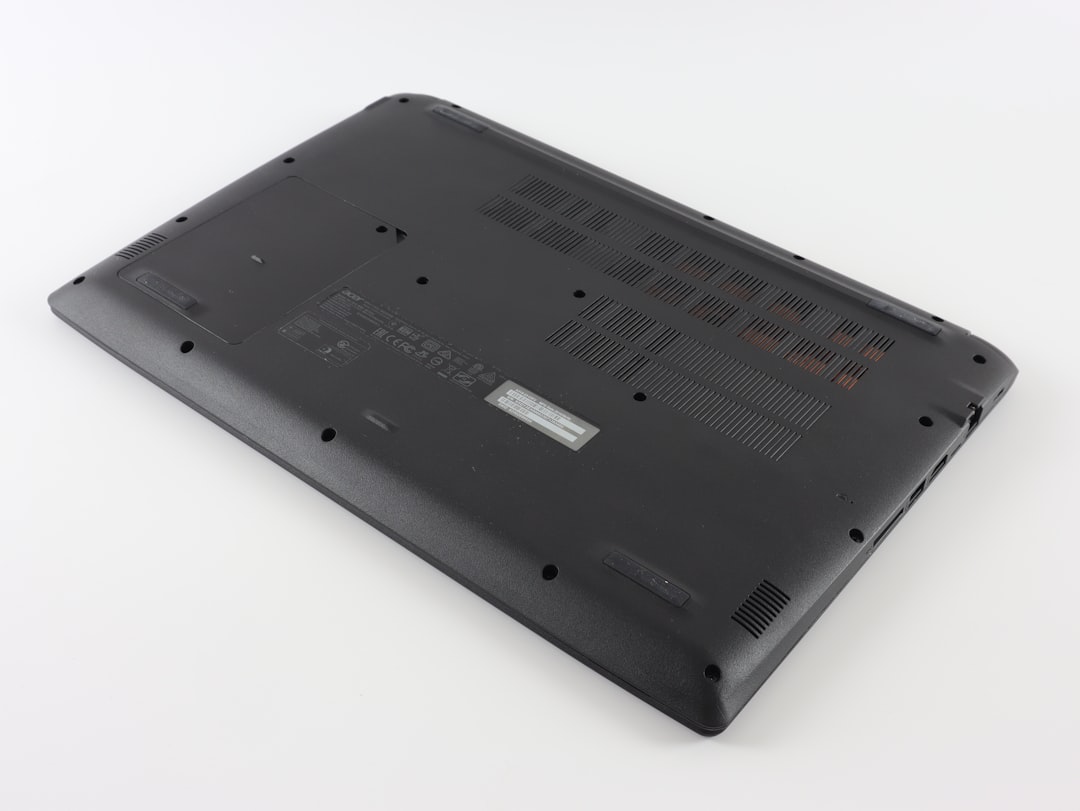
Tip: Take a photo of the serial number. Save it to your phone. Future you will be grateful.
Step 2: Go to the Official Acer Registration Page
Open your browser. Visit Acer’s official website for your country. Look for:
- Support
- Product Registration
- Or My Acer
Different regions may have slightly different layouts. That’s normal.
If you already have an Acer account, log in.
If not, create one. It takes about two minutes.
Step 3: Sign In or Create an Acer ID
To register your product, you need an account.
Creating one usually requires:
- Your email address
- A password
- Your name
- Your country
After signing up, you may receive a confirmation email. Click the link. Activate your account. Done.
Now log in and head to the product registration area.
Step 4: Enter Product Details
This part is quick.
You will be asked to enter:
- Serial number
- Product model (sometimes auto detected)
- Date of purchase
- Store or seller name
Double check everything. One wrong character in the serial number can cause errors.
Once complete, click Submit or Register.
You should receive a confirmation message. Sometimes an email confirmation too.

Step 5: Check Warranty Status
After registration, you can check your warranty details inside your account.
You’ll see:
- Warranty start date
- Warranty end date
- Type of warranty coverage
This is important. Some devices have:
- Standard limited warranty
- International travelers warranty
- Extended warranty (if purchased)
Now you know exactly where you stand.
How to Register Using the Acer Care Center App
Some Acer laptops come with built in software called Acer Care Center.
This tool makes registration even easier.
Here is how:
- Open Acer Care Center
- Click on Support or Warranty & Registration
- Sign in with your Acer ID
- Confirm your device details
Most of the technical info is auto filled. Less typing. Fewer mistakes.
If you don’t see the app, search for it in the Windows start menu.
Common Problems and How to Fix Them
Let’s tackle a few common issues.
1. Serial Number Not Recognized
- Check for typing errors.
- Avoid confusing 0 (zero) and O (letter).
- Make sure you selected the correct country website.
2. Product Already Registered
This can happen if:
- You previously registered it.
- The retailer pre registered it.
Contact Acer support. Provide proof of purchase. They can help transfer ownership.
3. Forgot Acer Account Password
Simple. Click Forgot Password. Reset via email. Problem solved.
What If You Don’t Register?
Your device may still have warranty coverage from the purchase date.
But here’s the catch:
- You may need to provide the original receipt every time.
- Support agents may take longer to verify your device.
- You might miss important service alerts.
Registration makes everything smoother.
Think of it as insurance paperwork. Boring now. Helpful later.
Extending Your Acer Warranty
Some regions offer extended warranty plans.
You can:
- Purchase extended coverage during registration.
- Add protection within a limited time after purchase.
Extended warranties may cover:
- Longer repair coverage
- Accidental damage (in some plans)
- Priority support
Read the terms carefully. Not all plans are identical.
Registering Other Acer Products
Acer makes more than laptops.
You can register:
- Monitors
- Desktops
- Chromebooks
- Tablets
- Projectors
- Gaming accessories
The process is usually the same. Serial number. Account login. Confirmation.

Tips for Keeping Warranty Valid
Registration is just step one. Protect your warranty by:
- Keeping your receipt safe.
- Avoiding unauthorized repairs.
- Using original Acer chargers and accessories.
- Not opening the device unless allowed.
Physical damage, liquid spills, and self repairs can void coverage in some cases.
When in doubt, contact support first.
How to Contact Acer Support
If something goes wrong, Acer offers several support options:
- Online support portal
- Live chat (in some regions)
- Email support
- Phone support
- Authorized service centers
Having a registered product speeds up all of this.
Your device information is already in the system. Less explaining. More fixing.
Final Thoughts
Registering your Acer product is not exciting. It is not flashy. It does not improve performance.
But it does something better.
It protects you.
In less than 10 minutes, you can:
- Confirm your warranty.
- Simplify future repairs.
- Get faster customer support.
- Sleep easier at night.
That is a fair trade.
So before you download games. Before you install software. Before you personalize wallpapers.
Register your Acer device.
Your future self will thank you.